# MySQL

# 身份鉴别

##### <span style="color: rgb(0, 0, 0);">**<span lang="ZH-CN">测评项：</span>a) <span lang="ZH-CN">应对登录的用户进行身份标识和鉴别，身份标识具有唯一性，身份鉴别信息具有复杂度要求并定期更换。</span>**</span>

<p class="callout info"><span lang="ZH-CN">MySQL通常不存在空口令账户，弱口令须通过<span style="color: rgb(35, 111, 161);">访谈</span>确定。</span></p>

```mysql
# MySQL 5.7及更低版本本命令行不适用。
select * from mysql.user where length(authentication_string) = 0 or authentication_string is null;
```

<span lang="ZH-CN">[![image.png](https://document.nat.ac.cn/uploads/images/gallery/2025-07/scaled-1680-/TfKimage.png)](https://document.nat.ac.cn/uploads/images/gallery/2025-07/TfKimage.png)</span>

<p class="callout warning">MySQL通常未预装<span style="color: rgb(35, 111, 161);">**validate\_password**</span>，须先核查是否安装插件后再核查相关参数。</p>

<p class="callout info"><span lang="ZH-CN">云服务客户租用数据库时通过云控制台查看，不适用本条命令。</span></p>

```mysql
# 核查插件形式的validate_password，从MySQL 5.7开始支持
select * from information_schema.plugins where plugin_name = 'validate_password';
# 核查模块形式的validate_password，从MySQL 8.0.2开始支持
select * from mysql.component;
# 核查MySQL当前口令策略，默认策略符合要求。
show variables LIKE 'validate_password%';
```

核查效果：（以<span style="color: rgb(35, 111, 161);">**插件**</span>形式安装validate\_password，从MySQL 5.7开始支持）

[![Snipaste_2025-07-29_16-43-04.png](https://document.nat.ac.cn/uploads/images/gallery/2025-07/scaled-1680-/snipaste-2025-07-29-16-43-04.png)](https://document.nat.ac.cn/uploads/images/gallery/2025-07/snipaste-2025-07-29-16-43-04.png)

核查效果：（以<span style="color: rgb(35, 111, 161);">**模块**</span>形式安装validate\_password，从MySQL 8.0.2开始支持）

[![Snipaste_2025-07-30_14-21-58.png](https://document.nat.ac.cn/uploads/images/gallery/2025-07/scaled-1680-/snipaste-2025-07-30-14-21-58.png)](https://document.nat.ac.cn/uploads/images/gallery/2025-07/snipaste-2025-07-30-14-21-58.png)

<p class="callout info"><span lang="ZH-CN">MySQL账户通常无法重复，账户名具有唯一性；MySQL支持单个用户名配置口令过期策略，仅在<span style="color: rgb(35, 111, 161);">**缺省**</span>时由全局配置确定。云服务客户租用数据库时通过云控制台查看，不适用本条命令。</span></p>

```mysql
# 查看MySQL全局口令过期策略。
show variables like 'default_password_lifetime';
# 查看MySQL 5.7最近口令更换情况。
select user, host, password_last_changed, password_lifetime from mysql.user;
# 查看MySQL 8.0最近口令更换情况。（支持限制使用重复密码）
select user, host, password_last_changed, password_lifetime,password_expired,password_reuse_history,password_reuse_time from mysql.user;
```

[![Snipaste_2025-07-29_18-06-20.png](https://document.nat.ac.cn/uploads/images/gallery/2025-07/scaled-1680-/snipaste-2025-07-29-18-06-20.png)](https://document.nat.ac.cn/uploads/images/gallery/2025-07/snipaste-2025-07-29-18-06-20.png)

核查效果：（在MySQL 5.7）

[![Snipaste_2025-07-30_16-21-52.png](https://document.nat.ac.cn/uploads/images/gallery/2025-07/scaled-1680-/snipaste-2025-07-30-16-21-52.png)](https://document.nat.ac.cn/uploads/images/gallery/2025-07/snipaste-2025-07-30-16-21-52.png)

核查效果：（在MySQL 8.0）

[![Snipaste_2025-07-30_16-22-24.png](https://document.nat.ac.cn/uploads/images/gallery/2025-07/scaled-1680-/snipaste-2025-07-30-16-22-24.png)](https://document.nat.ac.cn/uploads/images/gallery/2025-07/snipaste-2025-07-30-16-22-24.png)

---

##### <span style="color: rgb(0, 0, 0);">**<span lang="ZH-CN">测评项：</span>b) <span lang="ZH-CN">应具有登录失败处理功能，应配置并启用结束会话、限制非法登录次数和当登录连接超时自动退出等相关措施。</span>**</span>

<p class="callout warning">MySQL<span style="color: rgb(35, 111, 161);">**低版本不支持**</span>登录失败锁定策略，从MySQL 8.0开始支持单用户设置失败锁定策略，从MySQL 8.1开始支持锁定时长限制至小时或分钟。</p>

```mysql
select host,user,User_attributes from mysql.user;
# 核查 interactive_timeout参数
show variables like '%timeout';
```

[![Snipaste_2025-07-30_17-44-55.png](https://document.nat.ac.cn/uploads/images/gallery/2025-07/scaled-1680-/snipaste-2025-07-30-17-44-55.png)](https://document.nat.ac.cn/uploads/images/gallery/2025-07/snipaste-2025-07-30-17-44-55.png)[![Snipaste_2025-08-01_09-35-21.png](https://document.nat.ac.cn/uploads/images/gallery/2025-08/scaled-1680-/snipaste-2025-08-01-09-35-21.png)](https://document.nat.ac.cn/uploads/images/gallery/2025-08/snipaste-2025-08-01-09-35-21.png)

---

##### <span style="color: rgb(0, 0, 0);">**<span lang="ZH-CN">测评项：</span>c) <span lang="ZH-CN">当进行远程管理时，应采取必要措施防止鉴别信息在网络传输过程中被窃听。</span>**</span>

<p class="callout info">云服务客户租用数据库时仅核查当前会话，其他信息通过云控制台查看。</p>

```mysql
# 查看指定用户名（如root）是否强制使用TLS传输
select user, host, ssl_type from mysql.user where user = 'root';
# 查看是否全局开启强制TLS传输
show variables like 'require_secure_transport';
# 查看MySQL是否已开启TLS传输
show variables like 'have_ssl';
# 查看MySQL当前TLS相关配置信息
show global variables like 'ssl_cipher';
show global variables like 'ssl_ca';
show global variables like 'ssl_cert';
show global variables like 'ssl_key';
# （重点）查看当前会话是否采用TLS传输
show session status like 'ssl_cipher';
show session status LIKE 'Ssl_cipher_list';
show session status like 'ssl_version';
# 查看MySQL当前支持的TLS版本
show variables like 'tls_version';
```

[![Snipaste_2025-07-30_16-44-23.png](https://document.nat.ac.cn/uploads/images/gallery/2025-07/scaled-1680-/snipaste-2025-07-30-16-44-23.png)](https://document.nat.ac.cn/uploads/images/gallery/2025-07/snipaste-2025-07-30-16-44-23.png)

[![Snipaste_2025-07-30_16-44-57.png](https://document.nat.ac.cn/uploads/images/gallery/2025-07/scaled-1680-/snipaste-2025-07-30-16-44-57.png)](https://document.nat.ac.cn/uploads/images/gallery/2025-07/snipaste-2025-07-30-16-44-57.png)

---

##### <span style="color: rgb(0, 0, 0);">**<span lang="ZH-CN">测评项：</span>d) <span lang="ZH-CN">应采用口令、密码技术、生物技术等两种或两种以上组合的鉴别技术对用户进行身份鉴别， 且其中一种鉴别技术至少应使用密码技术来实现。</span>**</span>

<p class="callout danger"><span lang="ZH-CN">从MySQL **<span style="color: rgb(35, 111, 161);">8.0.27</span>**起，企业版支持<span style="color: rgb(35, 111, 161);">**FIDO**</span>，社区版支持<span style="color: rgb(35, 111, 161);">**TOTP**</span>，可在完成用户名+口令后支持二次验证。基于实际生产环境，默认不支持。</span></p>

# 访问控制

##### <span style="color: rgb(0, 0, 0);">**<span style="font-family: 等线; mso-ascii-font-family: Aptos; mso-ascii-theme-font: minor-latin; mso-fareast-theme-font: minor-fareast; mso-hansi-font-family: Aptos; mso-hansi-theme-font: minor-latin;">测评项：</span><span lang="EN-US">a) </span><span style="font-family: 等线; mso-ascii-font-family: Aptos; mso-ascii-theme-font: minor-latin; mso-fareast-theme-font: minor-fareast; mso-hansi-font-family: Aptos; mso-hansi-theme-font: minor-latin;">应对登录的用户分配账户和权限；</span>**</span>

##### <span style="color: rgb(0, 0, 0);">**<span style="font-family: 等线; mso-ascii-font-family: Aptos; mso-ascii-theme-font: minor-latin; mso-fareast-theme-font: minor-fareast; mso-hansi-font-family: Aptos; mso-hansi-theme-font: minor-latin;">测评项：</span><span lang="EN-US">b) </span><span style="font-family: 等线; mso-ascii-font-family: Aptos; mso-ascii-theme-font: minor-latin; mso-fareast-theme-font: minor-fareast; mso-hansi-font-family: Aptos; mso-hansi-theme-font: minor-latin;">应重命名或删除默认账户，修改默认账户的默认口令；</span>**</span>

<p class="callout info"><span style="color: rgb(0, 0, 0);"><span style="font-family: 等线; mso-ascii-font-family: Aptos; mso-ascii-theme-font: minor-latin; mso-fareast-theme-font: minor-fareast; mso-hansi-font-family: Aptos; mso-hansi-theme-font: minor-latin;">云数据库不存在默认账户，安装在本地服务器上则注意root账户是否已修改口令。</span></span></p>

##### <span style="color: rgb(0, 0, 0);">**<span style="font-family: 等线; mso-ascii-font-family: Aptos; mso-ascii-theme-font: minor-latin; mso-fareast-theme-font: minor-fareast; mso-hansi-font-family: Aptos; mso-hansi-theme-font: minor-latin;">测评项：</span><span lang="EN-US">c) </span><span style="font-family: 等线; mso-ascii-font-family: Aptos; mso-ascii-theme-font: minor-latin; mso-fareast-theme-font: minor-fareast; mso-hansi-font-family: Aptos; mso-hansi-theme-font: minor-latin;">应及时删除或停用多余的、过期的账户，避免共享账户的存在；</span>**</span>

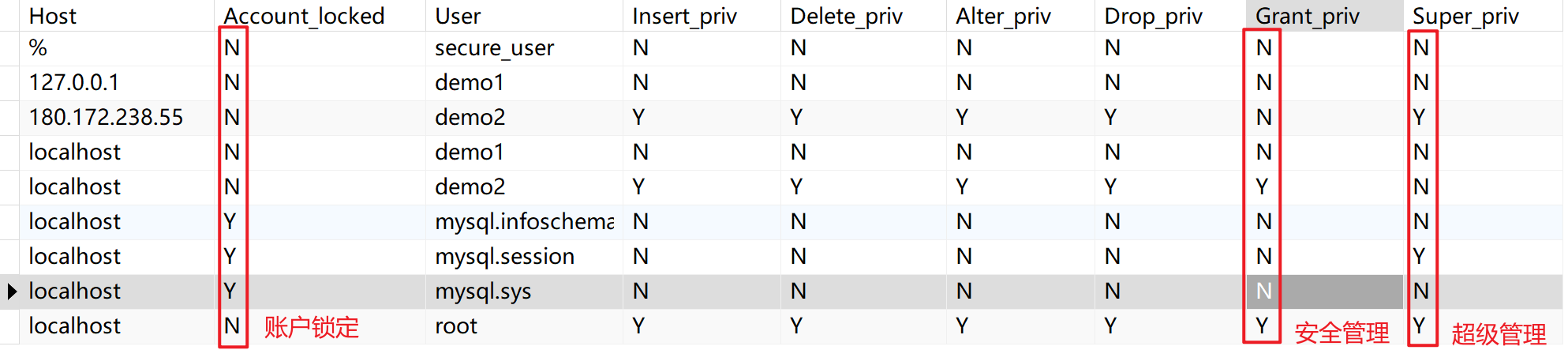
<p class="callout info"><span style="color: rgb(0, 0, 0);">多余/共享账户依据客户实际业务判定，但账户数小于3则强制判定共享账户。</span></p>

<p class="callout success"><span style="color: rgb(0, 0, 0);">通过访谈确定账户是否闲置；闲置账户处于锁定状态可视为不存在过期账户。</span></p>

```mysql
select Host,Account_locked,User,Insert_priv,Delete_priv,Alter_priv,Drop_priv,Grant_priv,Super_priv from mysql.user;
```

核查效果：

[![Snipaste_2025-08-01_11-11-35.png](https://document.nat.ac.cn/uploads/images/gallery/2025-08/scaled-1680-/snipaste-2025-08-01-11-11-35.png)](https://document.nat.ac.cn/uploads/images/gallery/2025-08/snipaste-2025-08-01-11-11-35.png)

---

##### **<span style="font-family: 等线; mso-ascii-font-family: Aptos; mso-ascii-theme-font: minor-latin; mso-fareast-theme-font: minor-fareast; mso-hansi-font-family: Aptos; mso-hansi-theme-font: minor-latin;">测评项：</span><span lang="EN-US">d) </span><span style="font-family: 等线; mso-ascii-font-family: Aptos; mso-ascii-theme-font: minor-latin; mso-fareast-theme-font: minor-fareast; mso-hansi-font-family: Aptos; mso-hansi-theme-font: minor-latin;">应授予管理用户所需的最小权限，实现管理用户的权限分离。</span>**

<p class="callout info"><span style="font-family: 等线; mso-ascii-font-family: Aptos; mso-ascii-theme-font: minor-latin; mso-fareast-theme-font: minor-fareast; mso-hansi-font-family: Aptos; mso-hansi-theme-font: minor-latin;">**<span style="font-family: 等线;">MySQL账户除日常使用的增删查改权限较为敏感外，针对等保场景须注意<span style="color: rgb(35, 111, 161);">Grant\_priv</span>和<span style="color: rgb(35, 111, 161);">Super\_priv</span>。前者可以扩展用户/数据库/数据库表的权限，后者可以管理所有的用户/数据库/数据库表。</span>**</span></p>

```mysql
select Host,Db,User,Insert_priv,Delete_priv,Alter_priv,Drop_priv,Grant_priv from mysql.db;
```

<span style="font-family: 等线;">[![Snipaste_2025-08-01_11-12-41.png](https://document.nat.ac.cn/uploads/images/gallery/2025-08/scaled-1680-/snipaste-2025-08-01-11-12-41.png)](https://document.nat.ac.cn/uploads/images/gallery/2025-08/snipaste-2025-08-01-11-12-41.png)</span>

---

##### **<span style="font-family: 等线; mso-ascii-font-family: Aptos; mso-ascii-theme-font: minor-latin; mso-fareast-theme-font: minor-fareast; mso-hansi-font-family: Aptos; mso-hansi-theme-font: minor-latin;">测评项：</span><span lang="EN-US">e</span><span style="font-family: 等线; mso-ascii-font-family: Aptos; mso-ascii-theme-font: minor-latin; mso-fareast-theme-font: minor-fareast; mso-hansi-font-family: Aptos; mso-hansi-theme-font: minor-latin;">）应由授权主体配置访问控制策略，访问控制策略规定主体对客体的访问规则；</span>**

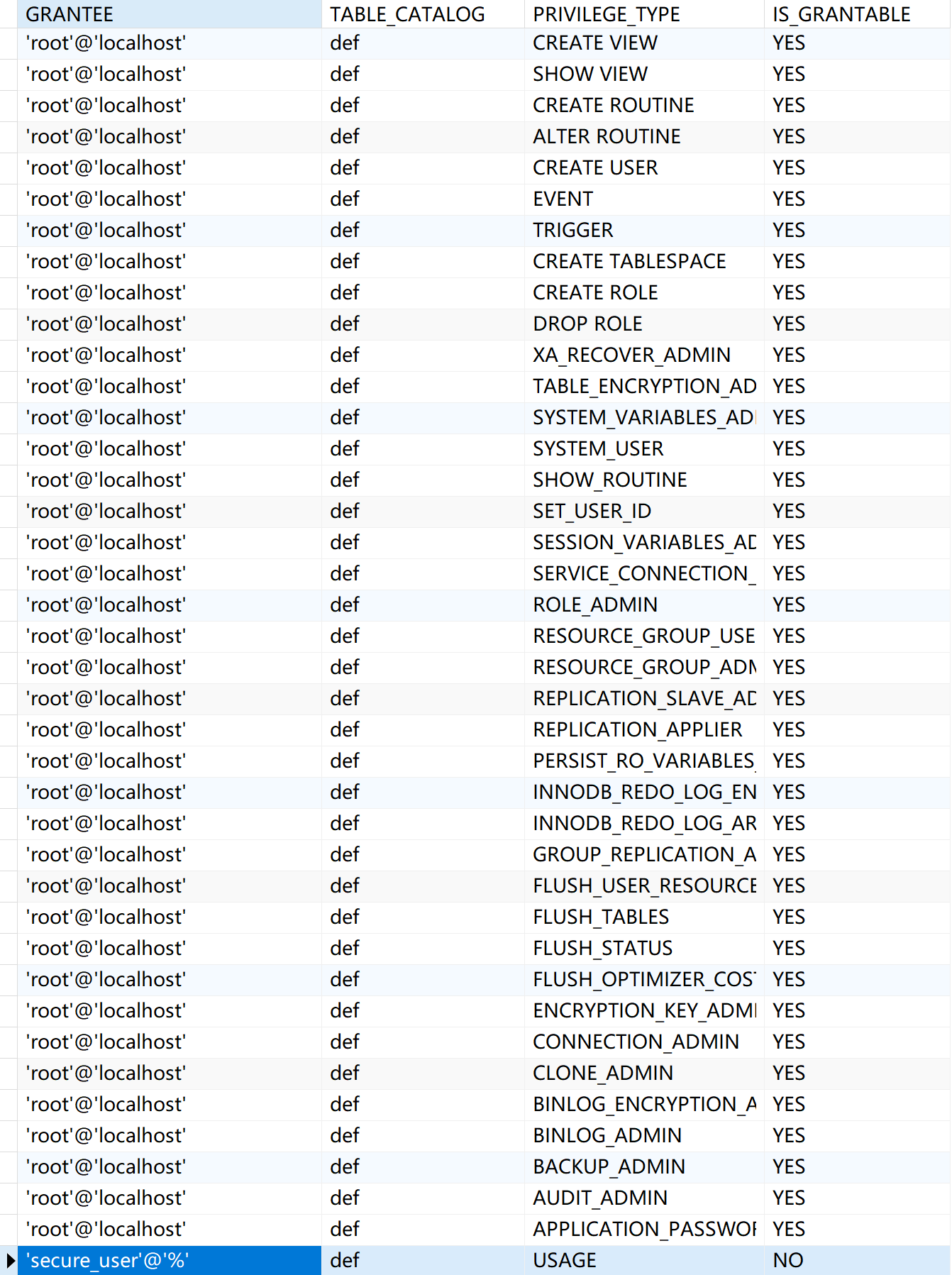
<p class="callout info">**<span style="font-family: 等线; mso-ascii-font-family: Aptos; mso-ascii-theme-font: minor-latin; mso-fareast-theme-font: minor-fareast; mso-hansi-font-family: Aptos; mso-hansi-theme-font: minor-latin;">现场核查优先核查当前用户名所关联的权限，后续查看<span style="color: rgb(53, 152, 219);">mysql.role\_edges</span>表和<span style="color: rgb(53, 152, 219);">infomation\_schema.user\_privileges</span>表所包含的具体内容。当role\_edges表值为<span style="color: rgb(53, 152, 219);">空</span>时，缺省值为<span style="color: rgb(53, 152, 219);">root</span>。</span>**</p>

```
-- show grants for '用户名'@'数据库';
SELECT * FROM `role_edges`;
SELECT * FROM `USER_PRIVILEGES`;
```

[![Snipaste_2025-08-01_14-48-05.png](https://document.nat.ac.cn/uploads/images/gallery/2025-08/scaled-1680-/snipaste-2025-08-01-14-48-05.png)](https://document.nat.ac.cn/uploads/images/gallery/2025-08/snipaste-2025-08-01-14-48-05.png)[![Snipaste_2025-08-01_14-48-26.png](https://document.nat.ac.cn/uploads/images/gallery/2025-08/scaled-1680-/snipaste-2025-08-01-14-48-26.png)](https://document.nat.ac.cn/uploads/images/gallery/2025-08/snipaste-2025-08-01-14-48-26.png)

---

##### **<span style="font-family: 等线; mso-ascii-font-family: Aptos; mso-ascii-theme-font: minor-latin; mso-fareast-theme-font: minor-fareast; mso-hansi-font-family: Aptos; mso-hansi-theme-font: minor-latin;">测评项：</span><span lang="EN-US">f</span><span style="font-family: 等线; mso-ascii-font-family: Aptos; mso-ascii-theme-font: minor-latin; mso-fareast-theme-font: minor-fareast; mso-hansi-font-family: Aptos; mso-hansi-theme-font: minor-latin;">）访问控制的粒度应达到主体为用户级或进程级，客体为文件、数据库表级；</span>**

<p class="callout success">**<span style="font-family: 等线; mso-ascii-font-family: Aptos; mso-ascii-theme-font: minor-latin; mso-fareast-theme-font: minor-fareast; mso-hansi-font-family: Aptos; mso-hansi-theme-font: minor-latin;">数据库与用户间是一对多的关系，因此默认符合。</span>**</p>

---

##### **<span style="font-family: 等线; mso-ascii-font-family: Aptos; mso-ascii-theme-font: minor-latin; mso-fareast-theme-font: minor-fareast; mso-hansi-font-family: Aptos; mso-hansi-theme-font: minor-latin;">测评项：</span><span lang="EN-US">g</span><span style="font-family: 等线; mso-ascii-font-family: Aptos; mso-ascii-theme-font: minor-latin; mso-fareast-theme-font: minor-fareast; mso-hansi-font-family: Aptos; mso-hansi-theme-font: minor-latin;">）应对重要主体和客体设置安全标记，并控制主体对有安全标记信息资源的访问。</span>**

<p class="callout danger">**<span style="font-family: 等线; mso-ascii-font-family: Aptos; mso-ascii-theme-font: minor-latin; mso-fareast-theme-font: minor-fareast; mso-hansi-font-family: Aptos; mso-hansi-theme-font: minor-latin;">MySQL不支持等保场景的安全标记功能，须依赖第三方实现，因此默认不符合。</span>**</p>

# 安全审计

<span style="color: rgb(224, 62, 45);">**<span style="font-family: 等线; mso-ascii-theme-font: minor-fareast; mso-fareast-theme-font: minor-fareast; mso-hansi-theme-font: minor-fareast;">测评项：<span lang="EN-US">a) </span>应启用安全审计功能，审计覆盖到每个用户，对重要的用户行为和重要安全事件进行审计。</span>**</span>

**<span style="font-family: 等线; mso-ascii-theme-font: minor-fareast; mso-fareast-theme-font: minor-fareast; mso-hansi-theme-font: minor-fareast;">核查点：日志要素</span>**

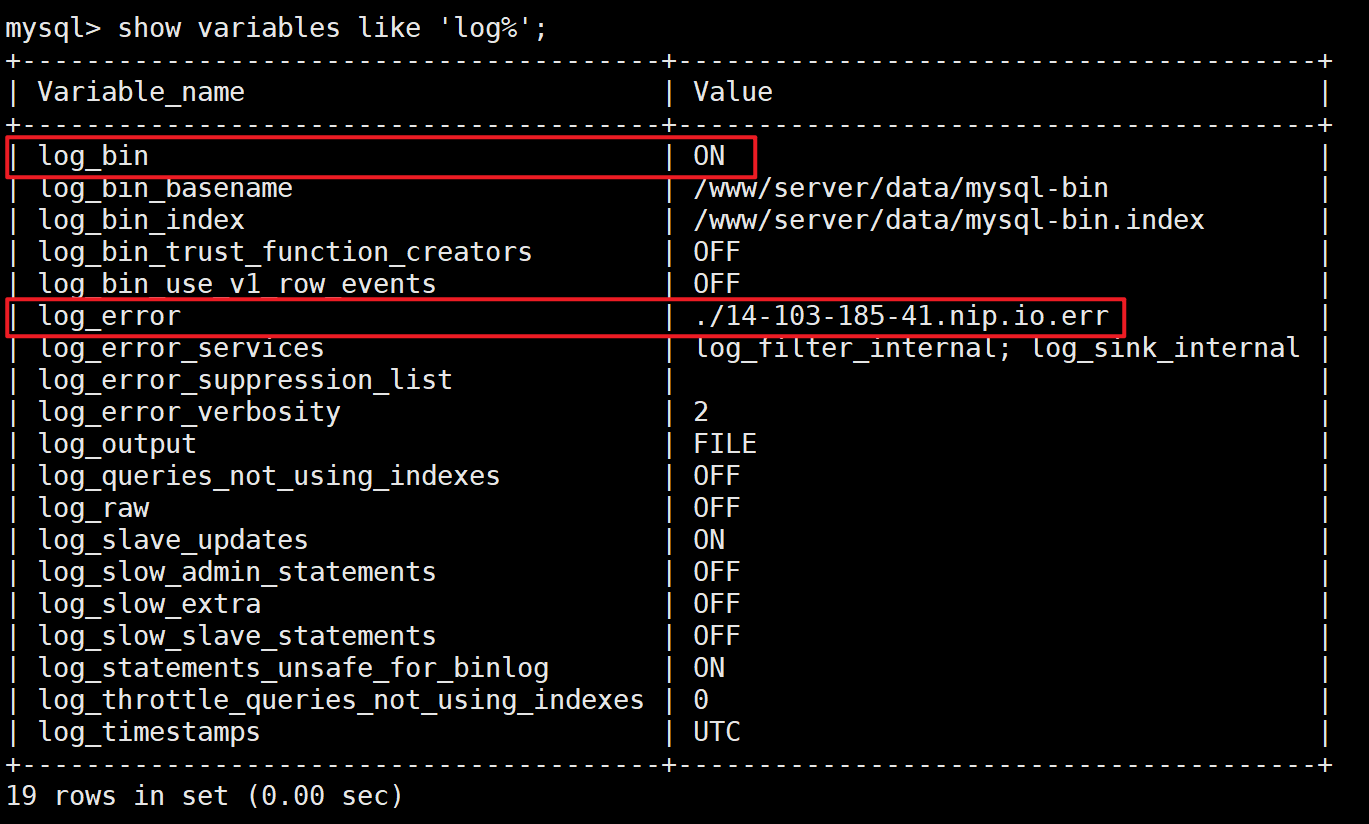
<p class="callout info"><span style="font-family: 等线; mso-ascii-theme-font: minor-fareast; mso-fareast-theme-font: minor-fareast; mso-hansi-theme-font: minor-fareast;">MySQL不对特定用户执行日志收集策略，默认覆盖所有用户。仅关注MySQL是否收集登录失败（**log\_error**）/ SQL语句执行（**log\_bin**）日志。</span></p>

<p class="callout warning"><span style="font-family: 等线; mso-ascii-theme-font: minor-fareast; mso-fareast-theme-font: minor-fareast; mso-hansi-theme-font: minor-fareast;">非必要**不推荐开启 general\_log** ，开启后MySQL会记录全量日志，极易影响系统的稳定运行。</span></p>

**<span style="font-family: 等线; mso-ascii-theme-font: minor-fareast; mso-fareast-theme-font: minor-fareast; mso-hansi-theme-font: minor-fareast;">核查命令</span>**

```mysql
show variables like 'log%';
```

<span style="font-family: 等线;">**核查效果**</span>

[![](https://cdn.sa.net/2025/08/28/o6aLwtv7GuBnlYe.png)](https://smms.app/image/o6aLwtv7GuBnlYe)

**<span style="font-family: 等线; mso-ascii-theme-font: minor-fareast; mso-fareast-theme-font: minor-fareast; mso-hansi-theme-font: minor-fareast;">测评项：<span lang="EN-US">b) </span>审计记录应包括事件的日期和时间、用户、事件类型、事件是否成功及其他与审计相关的信息。</span>**

**<span style="font-family: 等线; mso-ascii-theme-font: minor-fareast; mso-fareast-theme-font: minor-fareast; mso-hansi-theme-font: minor-fareast;">测评方法</span>**

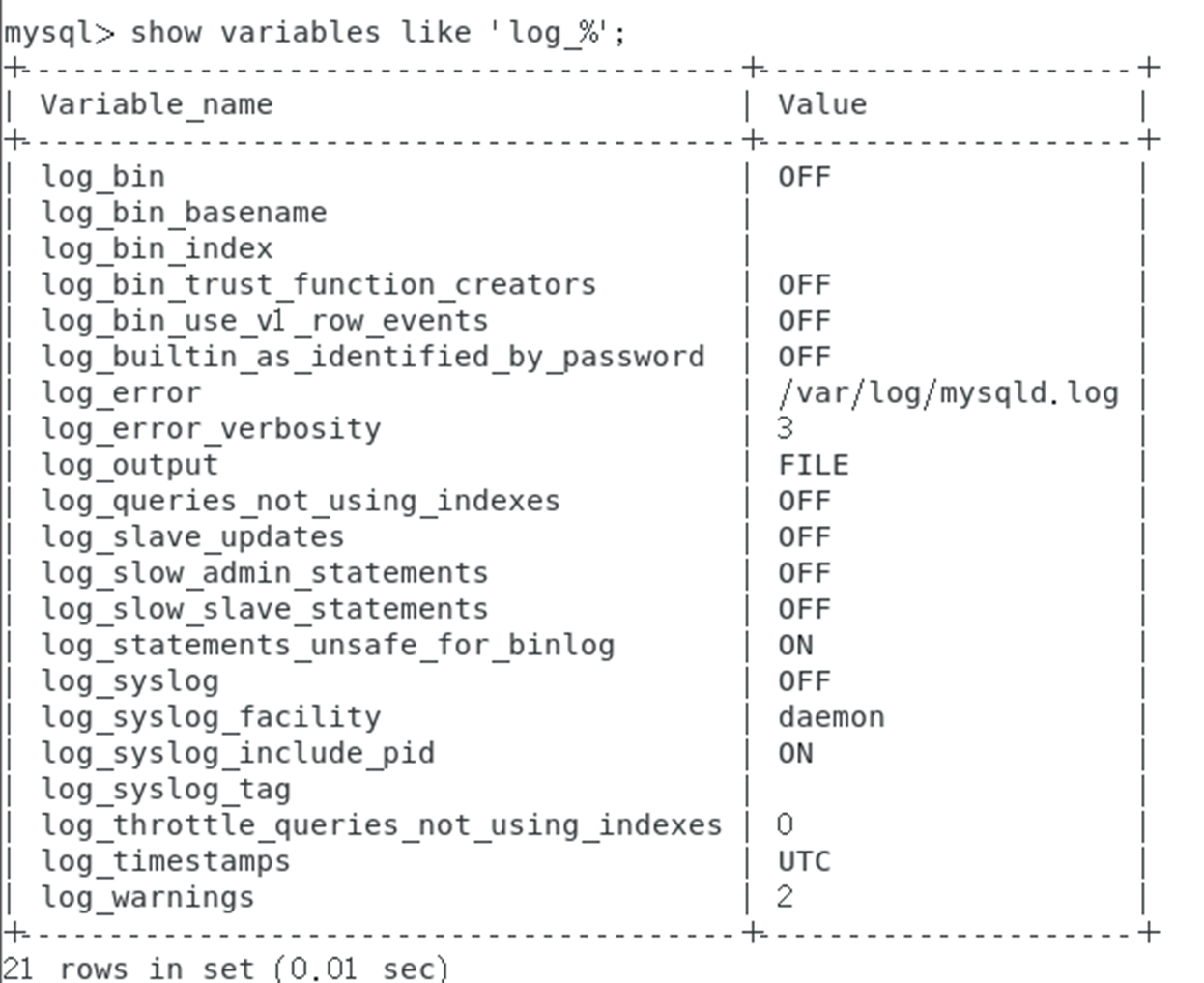
<span style="font-family: 等线; mso-ascii-theme-font: minor-fareast; mso-fareast-theme-font: minor-fareast; mso-hansi-theme-font: minor-fareast;">（<span lang="EN-US">1</span>）执行“<span lang="EN-US">mysql&gt;show variables like ‘log\_%’</span>”命令，查看输出的日志内容是否覆盖所有用户，并核查审计记录覆盖的内容。</span>

<span style="font-family: 等线; mso-ascii-theme-font: minor-fareast; mso-fareast-theme-font: minor-fareast; mso-hansi-theme-font: minor-fareast;">（<span lang="EN-US">2</span>）核查是否已使用第三方审计工具增强<span lang="EN-US">MySQL</span>的日志审计功能。如果使用了第三方审计工具，则查看其审计内容是否包含事件的日期和事件、用户、事件类型、事件是否成功及其他与审计相关的信息。</span>

**<span style="font-family: 等线; mso-ascii-theme-font: minor-fareast; mso-fareast-theme-font: minor-fareast; mso-hansi-theme-font: minor-fareast;">操作步骤<span lang="EN-US">&amp;</span>预期结果</span>**

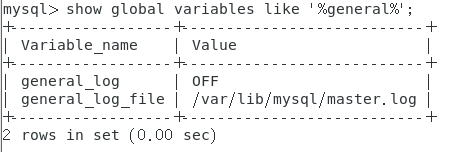
<span style="font-family: 等线; mso-ascii-theme-font: minor-fareast; mso-fareast-theme-font: minor-fareast; mso-hansi-theme-font: minor-fareast;">（<span lang="EN-US">1</span>）数据库本地启用了日志审计功能，审计内容覆盖每个用户，能够记录重要的用户行为和重要安全事件。</span>

<span lang="EN-US" style="font-family: 等线; mso-ascii-theme-font: minor-fareast; mso-fareast-theme-font: minor-fareast; mso-hansi-theme-font: minor-fareast;">①</span><span style="font-family: 等线; mso-ascii-theme-font: minor-fareast; mso-fareast-theme-font: minor-fareast; mso-hansi-theme-font: minor-fareast;"> <span lang="EN-US">show variables like 'log\_%';</span></span>

<span lang="EN-US" style="font-family: 等线; mso-ascii-theme-font: minor-fareast; mso-fareast-theme-font: minor-fareast; mso-hansi-theme-font: minor-fareast;"> </span><span lang="EN-US">[<span style="font-family: 等线; mso-ascii-theme-font: minor-fareast; mso-fareast-theme-font: minor-fareast; mso-hansi-theme-font: minor-fareast; color: windowtext; mso-no-proof: yes; text-decoration: none; text-underline: none;"><span style="mso-ignore: vglayout;">![](https://document.nat.ac.cn/uploads/images/gallery/2025-08/embedded-image-ogfndk3p.png)</span></span>](https://document.nat.ac.cn/uploads/images/gallery/2025-07/Youimage.png)</span>

<span lang="EN-US" style="font-family: 等线; mso-ascii-theme-font: minor-fareast; mso-fareast-theme-font: minor-fareast; mso-hansi-theme-font: minor-fareast;">②</span><span style="font-family: 等线; mso-ascii-theme-font: minor-fareast; mso-fareast-theme-font: minor-fareast; mso-hansi-theme-font: minor-fareast;"> <span lang="EN-US">show global variables like '%general%';</span></span>

<span lang="EN-US">[<span style="font-family: 等线; mso-ascii-theme-font: minor-fareast; mso-fareast-theme-font: minor-fareast; mso-hansi-theme-font: minor-fareast; color: windowtext; mso-no-proof: yes; text-decoration: none; text-underline: none;"><span style="mso-ignore: vglayout;">![表格

AI 生成的内容可能不正确。](https://document.nat.ac.cn/uploads/images/gallery/2025-08/embedded-image-nuntjbtk.png)</span></span>](https://document.nat.ac.cn/uploads/images/gallery/2025-07/Y0limage.png)</span>

<span style="font-family: 等线; mso-ascii-theme-font: minor-fareast; mso-fareast-theme-font: minor-fareast; mso-hansi-theme-font: minor-fareast;">（<span lang="EN-US">2</span>）使用了第三方数据库审计产品，审计内容覆盖每个用户，能够记录重要的用户行为和重要安全事件。</span>

**<span style="font-family: 等线; mso-ascii-theme-font: minor-fareast; mso-fareast-theme-font: minor-fareast; mso-hansi-theme-font: minor-fareast;">测评项：<span lang="EN-US">c) </span>应对审计记录进行保护，定期备份，避免受到未预期的删除、修改或覆盖等。</span>**

**<span style="font-family: 等线; mso-ascii-theme-font: minor-fareast; mso-fareast-theme-font: minor-fareast; mso-hansi-theme-font: minor-fareast;">测评方法</span>**

<span style="font-family: 等线; mso-ascii-theme-font: minor-fareast; mso-fareast-theme-font: minor-fareast; mso-hansi-theme-font: minor-fareast;">（<span lang="EN-US">1</span>）访谈管理员，了解审计记录的保护方式。核查审计记录是否定期备份，了解备份策略。</span>

<span style="font-family: 等线; mso-ascii-theme-font: minor-fareast; mso-fareast-theme-font: minor-fareast; mso-hansi-theme-font: minor-fareast;">（<span lang="EN-US">2</span>）核查是否已严格限制用户访问审计记录的权限。</span>

**<span style="font-family: 等线; mso-ascii-theme-font: minor-fareast; mso-fareast-theme-font: minor-fareast; mso-hansi-theme-font: minor-fareast;">操作步骤<span lang="EN-US">&amp;</span>预期结果</span>**

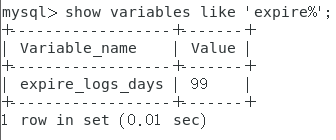
<span style="font-family: 等线; mso-ascii-theme-font: minor-fareast; mso-fareast-theme-font: minor-fareast; mso-hansi-theme-font: minor-fareast;">（<span lang="EN-US">1</span>）采用备份、转存等手段对审计记录进行保护，避免未预期的删除、修改或覆盖，数据库本地日志保存时间超过<span lang="EN-US">6</span>个月。</span>

<span lang="EN-US">[<span style="font-family: 等线; mso-ascii-theme-font: minor-fareast; mso-fareast-theme-font: minor-fareast; mso-hansi-theme-font: minor-fareast; color: windowtext; mso-no-proof: yes; text-decoration: none; text-underline: none;"><span style="mso-ignore: vglayout;">![图片包含 表格

AI 生成的内容可能不正确。](https://document.nat.ac.cn/uploads/images/gallery/2025-08/embedded-image-sukv3uft.png)</span></span>](https://document.nat.ac.cn/uploads/images/gallery/2025-07/knhimage.png)</span>

**<span lang="EN-US" style="font-family: 等线; mso-ascii-theme-font: minor-fareast; mso-fareast-theme-font: minor-fareast; mso-hansi-theme-font: minor-fareast;"> exprie\_logs\_days</span><span style="font-family: 等线; mso-ascii-theme-font: minor-fareast; mso-fareast-theme-font: minor-fareast; mso-hansi-theme-font: minor-fareast;">为日志存储时间（已经通过“<span lang="EN-US">set global expire\_logs\_days = 180;</span>”命令设置保存时间）</span>**

<span style="font-family: 等线; mso-ascii-theme-font: minor-fareast; mso-fareast-theme-font: minor-fareast; mso-hansi-theme-font: minor-fareast;">（<span lang="EN-US">2</span>）采用第三方数据库审计产品审计记录保存时间超过<span lang="EN-US">6</span>个月。</span>

**<span style="font-family: 等线; mso-ascii-theme-font: minor-fareast; mso-fareast-theme-font: minor-fareast; mso-hansi-theme-font: minor-fareast;">测评项：<span lang="EN-US">d) </span>应对审计进程进行保护，防止未经授权的中断。</span>**

**<span style="font-family: 等线; mso-ascii-theme-font: minor-fareast; mso-fareast-theme-font: minor-fareast; mso-hansi-theme-font: minor-fareast;">测评方法</span>**

<span style="font-family: 等线; mso-ascii-theme-font: minor-fareast; mso-fareast-theme-font: minor-fareast; mso-hansi-theme-font: minor-fareast;">（<span lang="EN-US">1</span>）核查是否已严格限制管理员、审计员的权限。</span>

<span style="font-family: 等线; mso-ascii-theme-font: minor-fareast; mso-fareast-theme-font: minor-fareast; mso-hansi-theme-font: minor-fareast;">（<span lang="EN-US">2</span>）尝试以用户身份重启实例、关闭审计功能，查看是否能成功（应为否）。</span>

**<span style="font-family: 等线; mso-ascii-theme-font: minor-fareast; mso-fareast-theme-font: minor-fareast; mso-hansi-theme-font: minor-fareast;">操作步骤<span lang="EN-US">&amp;</span>预期结果</span>**

<span style="font-family: 等线; mso-ascii-theme-font: minor-fareast; mso-fareast-theme-font: minor-fareast; mso-hansi-theme-font: minor-fareast;">（<span lang="EN-US">1</span>）非审计员账户无法中断审计进程，审计进程已受到保护。</span>

<span lang="EN-US">[<span style="font-family: 等线; mso-ascii-theme-font: minor-fareast; mso-fareast-theme-font: minor-fareast; mso-hansi-theme-font: minor-fareast; color: windowtext; mso-no-proof: yes; text-decoration: none; text-underline: none;"><span style="mso-ignore: vglayout;">![](https://document.nat.ac.cn/uploads/images/gallery/2025-08/embedded-image-7pmvf8pq.png)</span></span>](https://document.nat.ac.cn/uploads/images/gallery/2025-07/JSOimage.png)</span>

<span style="font-family: 等线; mso-ascii-theme-font: minor-fareast; mso-fareast-theme-font: minor-fareast; mso-hansi-theme-font: minor-fareast;">（<span lang="EN-US">2</span>）非审计员账户无法对审计进程纪念性开启、关闭操作。对这类操作有日志记录。</span>

<span lang="EN-US" style="font-family: 等线; mso-ascii-theme-font: minor-fareast; mso-fareast-theme-font: minor-fareast; mso-hansi-theme-font: minor-fareast;"></span>

# 入侵防范

<span style="color: rgb(224, 62, 45);">**<span style="font-family: 宋体;">测评项：</span><span style="mso-list: Ignore;">a) </span><span style="font-family: 宋体;">应遵循最小安装的原则，仅安装需要的组件和应用程序</span><span style="font-family: 宋体;">。</span>**</span>

**<span style="font-family: 宋体;">测评点：多余插件</span>**

<span style="font-family: 宋体;">**核查命令：**</span>

```pl/sql
show plugins;
```

**<span style="font-family: 宋体;">预期结果:</span>**

 [![image.png](https://document.nat.ac.cn/uploads/images/gallery/2025-07/scaled-1680-/OFfimage.png)](https://document.nat.ac.cn/uploads/images/gallery/2025-07/OFfimage.png)

<span style="color: rgb(224, 62, 45);">**<span style="font-family: 宋体;">测评项：</span><span style="mso-list: Ignore;">b) </span><span style="font-family: 宋体;">应通过设定终端接入方式或网络地址范围对通过网络进行管理的管理终端进行限制。</span>**</span>

**<span style="font-family: 宋体;">测评方法</span>**

<span style="mso-list: Ignore;">（1）</span><span style="font-family: 宋体;">执行</span><span style="font-family: 宋体;">“</span><span style="font-family: Times New Roman;">show grants for root@localhost</span><span style="font-family: 宋体;">”命令，查看用户登录的</span><span style="font-family: Times New Roman;">IP</span><span style="font-family: 宋体;">地址，核查是否给所有用户加上了</span><span style="font-family: Times New Roman;">IP</span><span style="font-family: 宋体;">地址限制以拒绝所有未知主机的连接。</span>

<span style="color: rgb(35, 111, 161);"><span style="font-family: 宋体;">注意：当</span><span style="font-family: Times New Roman;">user</span><span style="font-family: 宋体;">表中的</span><span style="font-family: Times New Roman;">Host</span><span style="font-family: 宋体;">值不在本地主机</span><span style="font-family: Times New Roman;">IP</span><span style="font-family: 宋体;">地址范围内时，应为其指定</span><span style="font-family: Times New Roman;">IP</span><span style="font-family: 宋体;">地址，使其不为“</span><span style="font-family: Times New Roman;">%</span><span style="font-family: 宋体;">”，或者将</span><span style="font-family: Times New Roman;">user</span><span style="font-family: 宋体;">表中的</span><span style="font-family: Times New Roman;">Host</span><span style="font-family: 宋体;">值置为空。在</span><span style="font-family: Times New Roman;">host</span><span style="font-family: 宋体;">表中指定允许用户账户登录访问的若干主机。在非信任的客户端以数据库账户登录的行为应被拒绝。用户从其他子网登录的行为也应被拒绝。</span></span>

**<span style="font-family: 宋体;">操作步骤</span>&amp;<span style="font-family: 宋体;">预期结果</span>**

<span style="mso-list: Ignore;">（1）</span><span style="font-family: 宋体;">已在防火墙上限制特定的终端（</span><span style="font-family: Times New Roman;">IP</span><span style="font-family: 宋体;">地址）连接（访问）数据库。</span>

[![image.png](https://document.nat.ac.cn/uploads/images/gallery/2025-07/scaled-1680-/uBZimage.png)](https://document.nat.ac.cn/uploads/images/gallery/2025-07/uBZimage.png)

 <span style="color: rgb(224, 62, 45);">**<span style="font-family: 宋体;">测评项：</span><span style="mso-list: Ignore;">c) </span><span style="font-family: 宋体;">应</span><span style="font-family: 宋体;">能发现可能存在的已知漏洞，并在经过充分测试评估后，及时修补漏洞。</span>**</span>

**<span style="font-family: 宋体;">测评方法</span>**

<span style="mso-list: Ignore;">（1）</span><span style="font-family: 宋体;">了解</span><span style="font-family: Times New Roman;">MySQL</span><span style="font-family: 宋体;">数据库的补丁升级机制，查看补丁安装情况。执行“</span><span style="font-family: Times New Roman;">show variables where variable\_name like </span><span style="font-family: Times New Roman;">“</span><span style="font-family: Times New Roman;">version</span><span style="font-family: Times New Roman;">”</span><span style="font-family: 宋体;">”命令查看当前补丁版本。</span>

<span style="mso-list: Ignore;">（2）</span><span style="font-family: 宋体;">核查数据库的版本是否为企业版，是否定期进行漏洞扫描，是否针对高风险漏洞安装了经过评估和测试的补丁。</span>

**<span style="font-family: 宋体;">操作步骤</span>&amp;<span style="font-family: 宋体;">预期结果</span>**

<span style="mso-list: Ignore;">（1）</span><span style="font-family: Times New Roman;">MySQL</span><span style="font-family: 宋体;">数据库目前并不存在高风险漏洞，补丁更新及时。</span>

[![image.png](https://document.nat.ac.cn/uploads/images/gallery/2025-07/scaled-1680-/eaeimage.png)](https://document.nat.ac.cn/uploads/images/gallery/2025-07/eaeimage.png)

<span style="mso-list: Ignore;">（2）</span><span style="font-family: Times New Roman;">MySQL</span><span style="font-family: 宋体;">数据库为企业版，定期进行漏洞扫描。对发现的数据库漏洞，已在测试和评估后进行修补。</span>

# 可信验证

##### 测评项：**a）可基于可信根对计算设备的系统引导程序、系统程序、重要配置参数和应用程序等进行可信验证，并在应用程序的关键执行环节进行动态可信验证，在检测到其可信性受到破坏后进行报警，并将验证结果形成审计记录送至安全管理中心**。

<p class="callout danger">MySQL无法实现可信验证。</p>

# 数据完整性/保密性

##### 测评项：**a）应采用校验技术或密码技术保证重要数据在传输过程中的完整性，包括但不限于鉴别数据、重要业务数据、重要审计数据、重要配置数据、重要视频数据和重要个人信息等**；  
测评项：**a）应采用密码技术保证重要数据在传输过程中的保密性，包括但不限于鉴别数据、重要业务数据和重要个人信息等**；

<p class="callout info">该项核查与身份鉴别c强相关，即仅允许使用TLS证书进行传输时为符合。</p>

```mysql
# 查看指定用户名（如root）是否强制使用TLS传输
select user, host, ssl_type from mysql.user where user = 'root';
# 查看是否全局开启强制TLS传输
show variables like 'require_secure_transport';
# 查看MySQL是否已开启TLS传输
show variables like 'have_ssl';
# 查看MySQL当前TLS相关配置信息
show global variables like 'ssl_cipher';
show global variables like 'ssl_ca';
show global variables like 'ssl_cert';
show global variables like 'ssl_key';
# （重点）查看当前会话是否采用TLS传输
show session status like 'ssl_cipher';
show session status LIKE 'Ssl_cipher_list';
show session status like 'ssl_version';
# 查看MySQL当前支持的TLS版本
show variables like 'tls_version';
```

[![](https://cdn.sa.net/2025/08/29/mlLfek53w67OnWX.png)](https://smms.app/image/mlLfek53w67OnWX)

[![](https://cdn.sa.net/2025/08/29/WvAU3G8griLPJfl.png)](https://smms.app/image/WvAU3G8griLPJfl)

---

##### 测评项：**b）应采用校验技术或密码技术保证重要数据在存储过程中的完整性，包括但不限于鉴别数据、重要业务数据、重要审计数据、重要配置数据、重要视频数据和重要个人信息等**。  
测评项：**b）应采用密码技术保证重要数据在存储过程中的保密性，包括但不限于鉴别数据、重要业务数据和重要个人信息等**。

<p class="callout warning">MySQL <span style="color: rgb(224, 62, 45);">**5.6**</span> 、MySQL <span style="color: rgb(224, 62, 45);">**5.7**</span>和 MySQL <span style="color: rgb(224, 62, 45);">**8.0.0**</span> ~<span style="color: rgb(224, 62, 45);">**8.0.33**</span> ，MySQL默认采用 <span style="color: rgb(224, 62, 45);">**mysql\_native\_password**</span> 插件。该插件依赖存在安全风险的<span style="color: rgb(224, 62, 45);">**SHA1**</span>算法。</p>

<p class="callout success">MySQL <span style="color: rgb(35, 111, 161);">**5.6**</span> ~ MySQL <span style="color: rgb(35, 111, 161);">**8.0.3**</span> 支持的**<span style="color: rgb(35, 111, 161);">sha256\_password</span>** 或 MySQL <span style="color: rgb(35, 111, 161);">**8.0.4**</span> 开始支持的<span style="color: rgb(35, 111, 161);">**caching\_sha2\_password**</span> 引入<span style="color: rgb(35, 111, 161);">**RSA**</span>公私钥对鉴别数据进行加密，两者均使用<span style="color: rgb(35, 111, 161);">**SHA256**</span>校验算法进行保存，区别在于后者加入缓存机制允许高并发操作。</p>

> The SHA-2 family consists of six hash functions with digests (hash values) that are 224, 256, 384 or 512 bits: SHA-224, SHA-256, SHA-384, SHA-512, SHA-512/224, SHA-512/256.
> 
> 原文详见：https://security.stackexchange.com/questions/87154/what-is-the-relationship-between-sha-2-and-sha-256
> 
> 翻译：SHA2家族包括SHA224、SHA256、SHA384、SHA512所有算法。

```mysql
-- 查看当前用户@地址口令段加密后的信息和所采用的算法
select user, host, plugin, authentication_string from mysql.user;
-- 查看私钥路径（caching_sha2_password）
show variables like 'caching_sha2_password_private_key_path';
-- 查看公钥路径（caching_sha2_password）
show variables like 'caching_sha2_password_public_key_path';
-- 查看当前通信使用的公钥
show status like 'caching_sha2_password_rsa_public_key';
-- 查看公钥路径（sha256_password）
SHOW VARIABLES LIKE 'sha256_password_public_key_path';
-- 查看私钥路径（sha256_password）
SHOW VARIABLES LIKE 'sha256_password_private_key_path';
-- 查看当前通信使用的公钥
show status like 'rsa_public_key';
```

[![](https://cdn.sa.net/2025/08/29/xbSN1U2Lzpi3FIP.png)](https://smms.app/image/xbSN1U2Lzpi3FIP)

# 数据备份恢复


# 剩余信息保护


# 核查与访谈（mysql）

##### MySQL 5.6 ~ MySQL 8.4 可核查的命令：

```mysql
-- 核查插件形式的validate_password，从MySQL 5.7开始支持
select * from information_schema.plugins where plugin_name = 'validate_password';
-- 核查MySQL当前口令策略，默认策略符合要求。
show variables LIKE 'validate_password%';
-- 查看MySQL全局口令过期策略。
show variables like 'default_password_lifetime';
-- 查看MySQL 5.7最近口令更换情况。
select user, host, password_last_changed, password_lifetime from mysql.user;
-- 核查 interactive_timeout参数
show variables like '%timeout';
-- 查看指定用户名（如root）是否强制使用TLS传输
select user, host, ssl_type from mysql.user where user = 'root';
-- 查看是否全局开启强制TLS传输
show variables like 'require_secure_transport';
-- 查看MySQL是否已开启TLS传输
show variables like 'have_ssl';
-- 查看MySQL当前TLS相关配置信息
show global variables like 'ssl_cipher';
-- 查看当前会话是否采用TLS传输
show session status like 'ssl_cipher';
show session status LIKE 'Ssl_cipher_list';
show session status like 'ssl_version';
-- 查看MySQL当前支持的TLS版本
show variables like 'tls_version';
-- 查看用户授权情况
select Host,Account_locked,User,Insert_priv,Delete_priv,Alter_priv,Drop_priv,Grant_priv,Super_priv from mysql.user;
-- 查看用户与数据库间授权关联
SELECT * FROM `role_edges`;
SELECT * FROM `USER_PRIVILEGES`;
-- 查看日志开启情况
show variables like 'log%';
-- 查看当前已安装的插件
-- 查看当前用户@地址口令段加密后的信息和所采用的算法
select user, host, plugin, authentication_string from mysql.user;
-- 查看公钥路径（sha256_password）
SHOW VARIABLES LIKE 'sha256_password_public_key_path';
-- 查看私钥路径（sha256_password）
SHOW VARIABLES LIKE 'sha256_password_private_key_path';
-- 查看当前通信使用的公钥
show status like 'rsa_public_key';
```

##### MySQL 8.0 ~MySQL 8.4的命令：  


```mysql
-- MySQL 5.7及更低版本本命令行不适用。
select * from mysql.user where length(authentication_string) = 0 or authentication_string is null;
-- 核查模块形式的validate_password，从MySQL 8.0.2开始支持
select * from mysql.component;
-- 查看MySQL 8.0最近口令更换情况。（支持限制使用重复密码）
select user, host, password_last_changed, password_lifetime,password_expired,password_reuse_history,password_reuse_time from mysql.user;
-- 核查 MySQL 8.0登录失败锁定情况
select host,user,User_attributes from mysql.user;
-- 查看私钥路径（caching_sha2_password）
show variables like 'caching_sha2_password_private_key_path';
-- 查看公钥路径（caching_sha2_password）
show variables like 'caching_sha2_password_public_key_path';
-- 查看当前通信使用的公钥
show status like 'caching_sha2_password_rsa_public_key';
```

##### MySQL 9.0 ~MySQL 9.5的命令：

```mysql
-- ========== 1. 密码验证策略检查 ==========
-- 1.1 核查密码验证组件（MySQL 8.0+ 从插件改为组件）
-- 注意：MySQL 8.0+ 使用 component_validate_password 组件替代旧的插件
SELECT * FROM mysql.component 
WHERE component_urn = 'file://component_validate_password';
-- 如果组件未安装，可使用以下命令安装：
-- INSTALL COMPONENT 'file://component_validate_password';

-- 1.2 核查MySQL当前口令策略（MySQL 8.0+ 变量名改为带点号格式）
SHOW VARIABLES LIKE 'validate_password.%';
-- 常见密码策略变量说明：
-- validate_password.length                 - 密码最小长度（默认8）
-- validate_password.policy                 - 策略等级（LOW/MEDIUM/STRONG）
-- validate_password.mixed_case_count       - 大小写字母最小数量
-- validate_password.number_count           - 数字最小数量
-- validate_password.special_char_count     - 特殊字符最小数量
-- validate_password.dictionary_file        - 字典文件路径

-- 1.3 查看MySQL全局口令过期策略
SHOW VARIABLES LIKE 'default_password_lifetime';
-- 说明：单位为天，0表示永不过期，建议设置为90天

-- 1.4 查看所有用户的密码更换情况和过期策略
SELECT user, host, 
       password_last_changed AS '最后修改时间',
       password_lifetime AS '密码有效期(天)',
       CASE 
           WHEN password_lifetime IS NULL THEN '使用全局策略'
           WHEN password_lifetime = 0 THEN '永不过期'
           ELSE CONCAT(password_lifetime, '天')
       END AS '过期策略说明'
FROM mysql.user
ORDER BY user, host;

-- ========== 2. 连接超时与会话检查 ==========
-- 2.1 核查所有超时相关参数
SHOW VARIABLES LIKE '%timeout';
-- 重点关注：
-- interactive_timeout    - 交互式连接超时（默认28800秒/8小时）
-- wait_timeout          - 非交互式连接超时
-- connect_timeout       - 连接握手超时

-- ========== 3. TLS/SSL 加密传输检查 ==========
-- 3.1 查看指定用户（如root）是否强制使用TLS传输
SELECT user, host, ssl_type,
       CASE ssl_type
           WHEN '' THEN '不要求TLS'
           WHEN 'ANY' THEN '要求TLS（任意加密）'
           WHEN 'X509' THEN '要求X509证书'
           WHEN 'SPECIFIED' THEN '要求指定证书'
       END AS 'TLS要求说明'
FROM mysql.user 
WHERE user = 'root';

-- 3.2 查看所有用户的TLS配置
SELECT user, host, ssl_type
FROM mysql.user
WHERE ssl_type != ''
ORDER BY user, host;

-- 3.3 查看是否全局开启强制TLS传输
SHOW VARIABLES LIKE 'require_secure_transport';
-- 说明：ON表示所有连接必须使用TLS，OFF表示可选

-- 3.4 查看MySQL是否已开启TLS传输能力
SHOW VARIABLES LIKE 'have_ssl';
-- 说明：YES表示已启用，DISABLED表示未启用

-- 3.5 查看MySQL当前TLS相关配置信息
SHOW GLOBAL VARIABLES LIKE 'ssl_%';
-- 重点关注：
-- ssl_ca        - CA证书路径
-- ssl_cert      - 服务器证书路径
-- ssl_key       - 服务器私钥路径
-- ssl_cipher    - 允许的加密套件

-- 3.6 查看当前会话是否采用TLS传输
SHOW SESSION STATUS LIKE 'ssl_cipher';
SHOW SESSION STATUS LIKE 'Ssl_cipher_list';
SHOW SESSION STATUS LIKE 'ssl_version';
-- 说明：如果ssl_cipher为空，表示当前会话未使用TLS

-- 3.7 查看MySQL当前支持的TLS版本
SHOW VARIABLES LIKE 'tls_version';
-- 建议：至少支持 TLSv1.2, TLSv1.3，禁用TLSv1和TLSv1.1

-- ========== 4. 用户权限与授权检查 ==========
-- 4.1 查看所有用户的基本权限（MySQL 9.0 兼容写法）
SELECT Host, User, Account_locked AS '账户锁定',
       Insert_priv AS '插入', 
       Delete_priv AS '删除', 
       Alter_priv AS '修改', 
       Drop_priv AS '删除表', 
       Grant_priv AS '授权', 
       Super_priv AS '超级权限',
       Create_role_priv AS '创建角色',
       Drop_role_priv AS '删除角色'
FROM mysql.user
ORDER BY User, Host;
-- 注意：Super_priv 在 MySQL 8.0+ 逐步被动态权限替代

-- 4.2 查看用户与角色的关联关系
SELECT FROM_HOST AS '来源主机', 
       FROM_USER AS '来源用户', 
       TO_HOST AS '目标主机', 
       TO_USER AS '目标用户',
       WITH_ADMIN_OPTION AS '可再授权'
FROM mysql.role_edges
ORDER BY FROM_USER, TO_USER;

-- 4.3 查看所有用户的全局权限
SELECT GRANTEE AS '授权对象', 
       PRIVILEGE_TYPE AS '权限类型', 
       IS_GRANTABLE AS '可授权'
FROM information_schema.USER_PRIVILEGES
ORDER BY GRANTEE, PRIVILEGE_TYPE;

-- 4.4 查看数据库级别的权限
SELECT Host, User, Db AS '数据库',
       Select_priv, Insert_priv, Update_priv, Delete_priv,
       Create_priv, Drop_priv, Grant_priv
FROM mysql.db
ORDER BY Db, User;


-- ========== 5. 日志审计检查 ==========

-- 5.1 查看所有日志相关配置
SHOW VARIABLES LIKE 'log%';
-- 重点关注：
-- log_error              - 错误日志路径
-- general_log            - 通用查询日志（性能影响大，生产环境慎用）
-- slow_query_log         - 慢查询日志
-- log_bin                - 二进制日志（主从复制必需）
-- log_bin_trust_function_creators - 二进制日志函数创建权限

-- 5.2 查看审计日志插件状态（如果安装了审计插件）
SELECT PLUGIN_NAME, PLUGIN_STATUS, PLUGIN_TYPE, PLUGIN_LIBRARY
FROM information_schema.PLUGINS
WHERE PLUGIN_NAME LIKE '%audit%';

-- ========== 6. 用户认证与加密检查 ==========
-- 6.1 查看所有用户的认证插件和加密信息
SELECT user, host, 
       plugin AS '认证插件',
       CASE plugin
           WHEN 'mysql_native_password' THEN 'MySQL 5.7 原生认证'
           WHEN 'caching_sha2_password' THEN 'MySQL 8.0+ 缓存SHA2认证（推荐）'
           WHEN 'sha256_password' THEN 'SHA256认证'
           WHEN 'auth_socket' THEN 'Socket认证（仅本地）'
           ELSE plugin
       END AS '认证方式说明',
       CHAR_LENGTH(authentication_string) AS '密文长度'
FROM mysql.user
ORDER BY user, host;
-- 建议：MySQL 9.0 推荐使用 caching_sha2_password

-- 6.2 查看 sha256_password 公钥路径
SHOW VARIABLES LIKE 'sha256_password_public_key_path';

-- 6.3 查看 sha256_password 私钥路径
SHOW VARIABLES LIKE 'sha256_password_private_key_path';

-- 6.4 查看当前通信使用的RSA公钥
SHOW STATUS LIKE 'rsa_public_key';


-- ========== 7. 组件与插件检查（MySQL 8.0+/9.0 推荐） ==========
-- 7.1 查看所有已安装的组件（MySQL 8.0+ 新特性）
SELECT component_id, component_group_id, component_urn
FROM mysql.component
ORDER BY component_id;

-- 7.2 使用 SHOW COMPONENTS 命令（MySQL 8.0.17+）
SELECT component_id AS '组件ID', 
       component_group_id AS '组件组ID', 
       component_urn AS '组件URN'
FROM mysql.component
ORDER BY component_id;

-- 7.3 查看所有已安装的插件
SELECT PLUGIN_NAME, PLUGIN_VERSION, PLUGIN_STATUS, PLUGIN_TYPE, PLUGIN_LIBRARY
FROM information_schema.PLUGINS
WHERE PLUGIN_STATUS = 'ACTIVE'
ORDER BY PLUGIN_TYPE, PLUGIN_NAME;


-- ========== 8. 动态权限检查（MySQL 8.0+/9.0 新特性） ==========
-- 8.1 查看所有动态权限（替代部分Super_priv功能）
SELECT USER AS '用户', HOST AS '主机', PRIV AS '动态权限'
FROM mysql.global_grants
ORDER BY USER, HOST, PRIV;

-- 常见动态权限：
-- ROLE_ADMIN                    - 角色管理
-- BINLOG_ADMIN                  - 二进制日志管理
-- CONNECTION_ADMIN              - 连接管理
-- REPLICATION_SLAVE_ADMIN       - 复制从库管理
-- SYSTEM_VARIABLES_ADMIN        - 系统变量管理
-- BACKUP_ADMIN                  - 备份管理


-- ========== 9. 安全相关系统变量检查 ==========
SHOW VARIABLES WHERE Variable_name IN (
    'local_infile',                    -- 禁止加载本地文件（安全风险）
    'secure_file_priv',               -- 限制文件导入导出路径
    'skip_name_resolve',              -- 跳过DNS解析（提升性能和安全）
    'sql_mode',                       -- SQL模式
    'max_connect_errors',             -- 最大连接错误次数
    'max_connections',                -- 最大连接数
    'max_user_connections'            -- 单用户最大连接数
);


-- ========== 10. 空密码和弱密码用户检查 ==========
-- 10.1 检查空密码用户（严重安全隐患）
SELECT user, host, '!!!空密码账户!!!' AS '安全风险'
FROM mysql.user
WHERE authentication_string = '' OR authentication_string IS NULL;

-- 10.2 检查通配符主机用户（安全风险）
SELECT user, host, '允许任意主机连接' AS '安全风险'
FROM mysql.user
WHERE host = '%'
ORDER BY user;


-- ============================================================
-- 脚本执行完毕
-- ============================================================

SELECT '
============================================================
MySQL 9.0 安全审计检查完成！

建议操作：
1. 确保 caching_sha2_password 组件已安装
2. 所有用户密码长度应 >= 8 位，包含大小写字母、数字和特殊字符
3. 启用密码过期策略（建议90-180天）
4. 生产环境强制启用 TLS/SSL 传输
5. 移除空密码账户和不必要的通配符主机授权
6. 定期审计用户权限，遵循最小权限原则
7. 启用慢查询日志和错误日志
8. 禁用 local_infile，设置 secure_file_priv
9. 使用角色管理权限，避免直接授予过高权限
10. MySQL 9.0 推荐使用动态权限替代 Super_priv
============================================================
' AS '审计建议';

```